

Release Notes DartCounter v9.0.0
What’s New & What’s Fixed: December Update
3 December 2025
Redesign
DartCounter has had a full refresh. New colours, new layout, same steady mate on the oche.
The app is cleaner, calmer, and built to help you focus on your next throw.
Stats that actually keep up with you
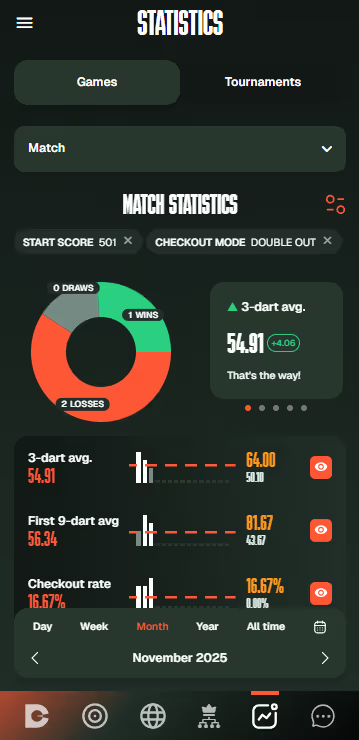
Your profile and stats page are rebuilt from the ground up.
See your all-time levels, how often you hit each 3-dart range, and how your throws spread out over time.
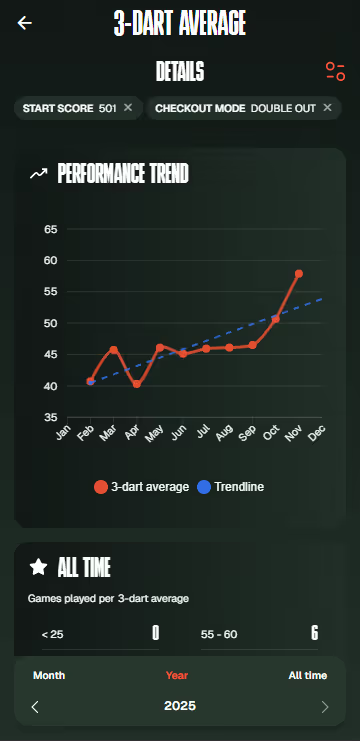
Pick a date range and game mode and watch your performance trend line move with you.
Every key stat (3-dart average, first 9-dart average, checkout rate, checkouts, best legs) now shows up in 15 chunks, so you can spot streaks and off nights at a glance.
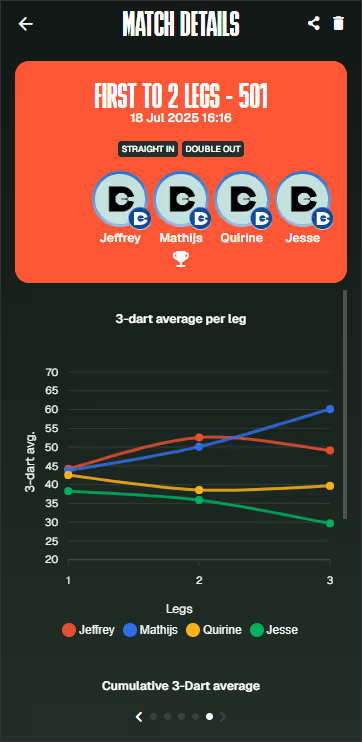
We’ve also added extra graphs for every game mode.
Line charts and target breakdowns give you a clearer view of where you’re getting more accurate and where there’s still room to sharpen your aim.
Select a time range to instantly see how much you’ve improved across your key stats - like 3-dart average, first 9, checkout rate and best legs - shown as a clear percentage. Extensive statistics for all game modes, so you can improve in every game or training session.
Keep your clock in sync
You might see a prompt asking you to reset your clock. Online games run on tight timing, and your phone or computer needs to match that. If your clock drifts a bit, scores and turns can desync. Set your time to automatic and you’re good to throw again.
Master Caller: name requests simplified
Name requests now follow a cleaner flow.
- Only email-verified accounts can request a caller
- Free users get one request total
- Ultimate members get one per month
- No match? Tap the new button to contact us directly
VIRT & Action Replays behave again
- The Action Replay button stays visible after disconnecting VirtCam, and now shows a clear error when tapped
- During local play, the Your Camera pop-up closes properly after choosing a camera or VirtCam option
Throw First: no more ‘no score’ faults
- Winning the throw should give you a full visit.
- We’ve fixed two issues that auto-submitted No Score for players without Omni.
Fixes & Tweaks
- Date picker picks and shows the correct dates again
- Friend request dialogue in the online lobby now lets you decline properly
- Cricket shows the +60 boost correctly in 3+ player games
- Single-dart edit now allows bust values
- Last score now shows in Score Training stats
- Rematch starts as expected
- Master Caller now always announces “you require”
- Profile privacy defaults to Friends Only for new accounts
UI & Interface
A long list of small fixes to make things smoother:
- Edit Profile has proper safe padding
- Friends list spinner shows in the right place
- In-game stats scale better on bigger screens
- Consistent help icons across the app
- Action Replay view now has correct safe padding
- Tournament history scrolls fully
- Incoming invite text is corrected and ready for localisation
- Keyboard hides itself when no hardware keyboard exists
- Better spacing in friend requests, filter pills, brackets and QR dialogs
- Cleaner line-height on longer texts
- Fixed visibility issues in the online gameplay tab
- Proper spacing between players and bull screen in landscape
- “No friends found” now shows in both My Friends and chat setup
New: crop your online setup image
You can now crop your online setup photo just like your profile picture.
Sharper images. Smaller files.